

Candidate Submittal CC and BCC Settings
Skip to main content
How Can We Help?
Exelare users can automatically CC or BCC to pre-defined email(s) or to the candidate when a resume is submitted via email.
- Email submissions to your Candidates(external communication)
- Email submissions to Owner or Colleague (within your team)
Please follow the below steps:
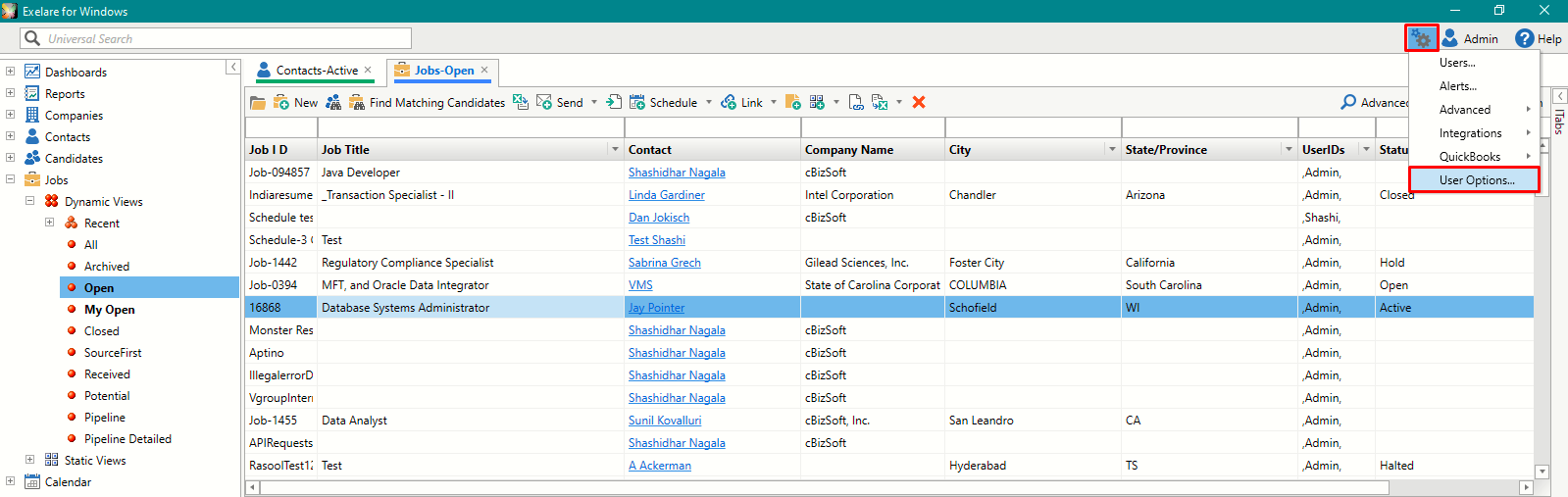
1. In Exelare click on Settings (ICON) > User Options > Email > Resume.
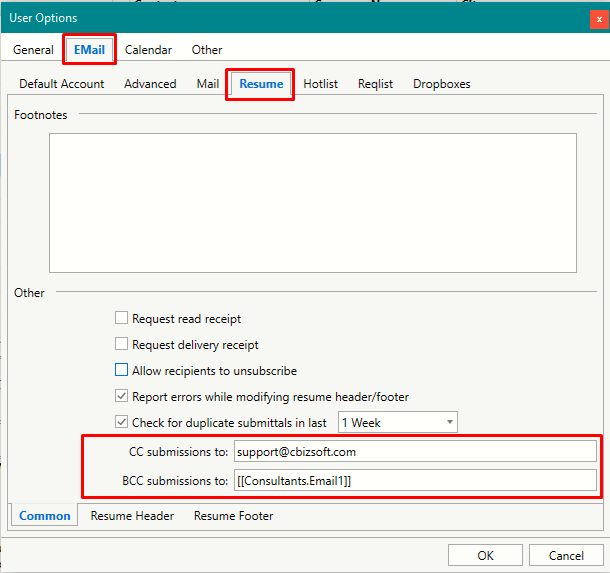
- In “CC Submissions To” add the desired email(s) to whom you want to copy all submissions. ( Ex: Support@cbizsoft.com,sales@cbizsoft.com ).
To copy more than one email address. Simply enter desired emails separated by a comma. Doing so Exelare will automatically fill in CC while resume submission emails are being sent.
- In “BCC Submissions To” add the desired email(s) or type in [[Consultants.Email1]]. By doing so Exelare will fetch candidate email and include in BCC while resume submission email is being sent.