Filter Resumes based on Editdate
Skip to main content
How Can We Help?
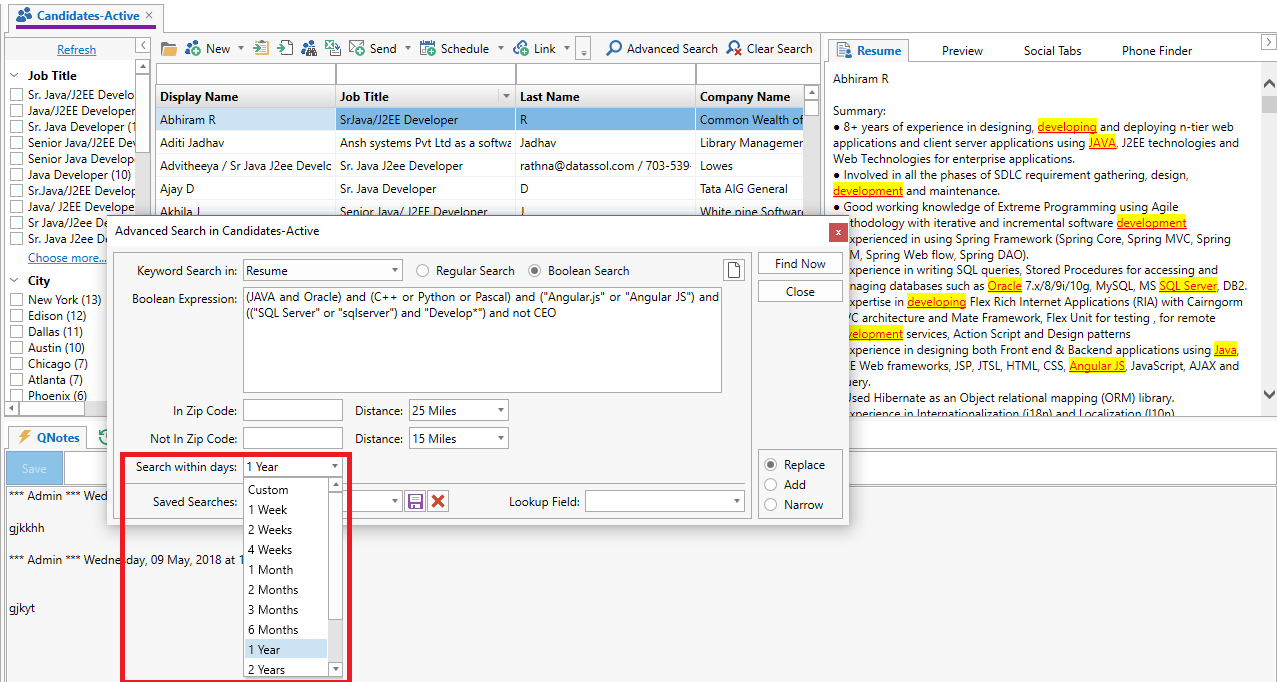
We have added a new filter within the
“Advanced Search” called “Search within days” to search resumes based on the last edited date. Resume Freshness indicates when a candidate was
last updated in Exelare. You can search Resume
Freshness by using the drop-down in the bottom left corner of the “Advanced
Search” window under “Search within days”. By Default it searches with 1year as the default filter.
- In Candidate, click
on “Advanced Search” button. - Enter your search
strings in Regular or Boolean. - Choose 1 Month, 1
Year, 2 Years etc. from the drop-down under “Search within days”. - Click on “Find Now”.
This will give you the result
of all candidates that were last updated within the days selected.